Dynamics 365
 Power Platform
 Dynamics
 Cloud & Productivity
How to get more value from Dynamics 365 Finance & Operations after go-live

Go-live feels like the finish line. The project team celebrates, the consultants roll off, and the budget closes. Then the real work begins, because a running ERP and a valuable ERP are not the same thing.
The gap between them is well documented. Gartner predicts that more than 70% of recently implemented ERP initiatives will fail to fully meet their original business case goals by 2027, and that as many as 25% will fail catastrophically. Those projects did not crash on launch day. They quietly underdelivered for years while everyone assumed the system was doing its job.
The good news is that closing this gap rarely requires new software. This blog covers practical ways to get more value from Dynamics 365 Finance & Operations after go-live, and almost all of them use capabilities you already own.
Quick answer: What does getting more value from D365 F&O actually mean?
Getting more value from Dynamics 365 Finance & Operations after go-live means activating unused native features, improving system performance, right-sizing licenses, adopting relevant Microsoft capabilities, and measuring outcomes against business KPIs. It does not always require additional software. Much of the untapped value may already exist within the platform.
Start with a post-go-live health check
You cannot improve what you have not measured. Before changing the system, take an honest inventory of its current state.
A good health check answers a few specific questions:
- Which modules are live, and which were descoped during the project?
- Which processes still run outside the system?
- Where do users work around the ERP instead of inside it?
- How long does your close actually take today?
- Which reports do people rebuild in Excel every month?
Write those answers down, because they become the baseline for everything you do next. An ERP implementation health check gives you a structured version of this exercise, with outside eyes on the results.
Pay particular attention to data quality. Many projects defer data governance until after go-live, allowing legacy inconsistencies to carry forward. Inconsistent vendor, customer, item, and financial-dimension setups can undermine reporting and automation for years.
Use the features you already pay for
In post-go-live assessments, we commonly find that the system is technically stable but key processes remain outside it. The right areas to optimize will vary by company and industry. A distributor may focus on rebates, pricing, or inventory visibility, while a nonprofit may prioritize grant reporting or approvals, and a project-based organization may focus on time, expenses, and billing. For many finance teams, reporting, approvals, budgeting, expense management, and recurring close activities are often the first areas where unused functionality becomes visible.
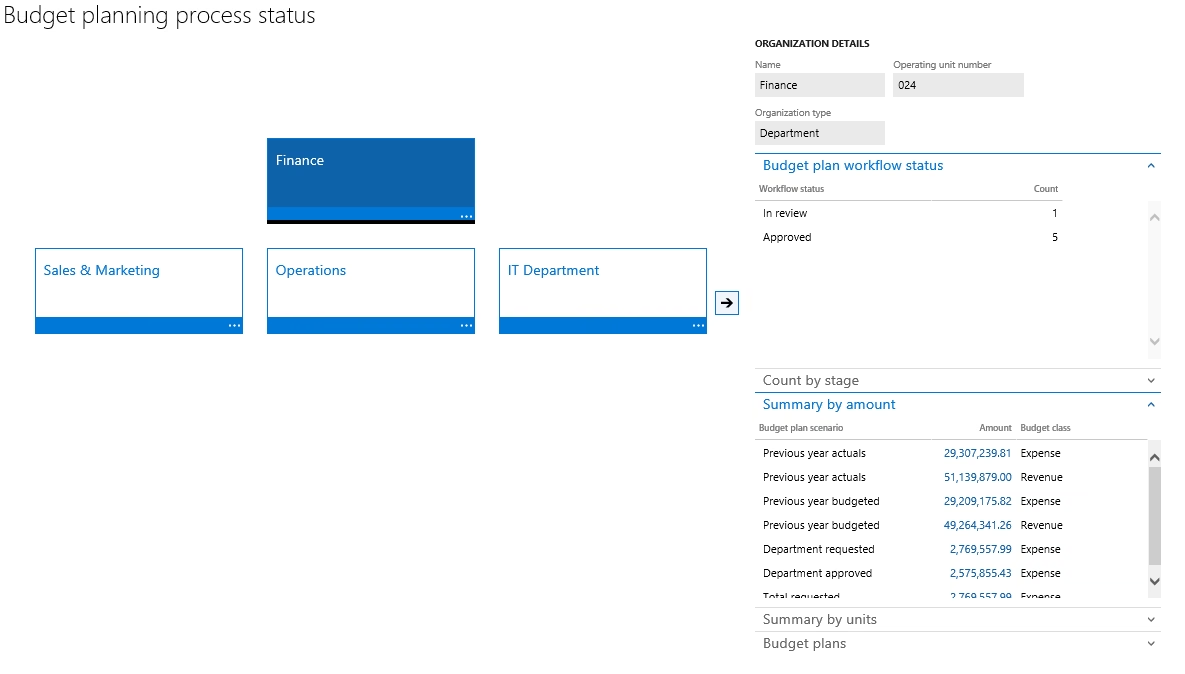
Budget planning with multiple scenarios
Many finance teams still create and manage budgets in Excel, even though D365 F&O includes a budget-planning framework.
Organizations can create budget scenarios for different assumptions, such as conservative, expected, and optimistic forecasts. Budget plans can incorporate historical transaction and general-ledger data, allocations, approval workflows, version control, and access based on roles or financial dimensions.
Moving more of the budgeting process into the system can provide better governance and make it easier to compare budgeted and actual results. For a deeper look at budgeting capabilities, scenario planning, and financial planning processes, read our guide to advanced budgeting in Dynamics 365 Finance & Operations.
Recurring journals and accrual processes
Rent, leases, subscriptions, and service contracts may generate entries that repeat every period. When finance teams enter them manually during every close, they add unnecessary work and increase the risk of inconsistent postings.
Recurring journals can help automate entries that follow a predictable schedule, while allocation rules can distribute amounts across accounts and financial dimensions. Organizations should use the appropriate accrual, deferral, or revenue-recognition processes to help record expenses and revenue in the correct accounting period. Every appropriate entry you automate is one less item the finance team needs to enter and reconcile manually.
Expense management and audit controls
Employee expenses are another area where organizations may leave native D365 F&O capabilities underused after go-live. If expense reports are still reviewed manually, policy exceptions are handled inconsistently, or audit samples are managed outside the system, Expense Management and Audit Workbench may offer an opportunity to improve control without adding separate software.
Expense Management can help enforce spending policies, receipt requirements, approval workflows, and expense categorization during submission. Audit Workbench can then evaluate approved expense activity for duplicate submissions, unusual patterns, threshold exceptions, or transactions selected for audit review.
Together, these tools can help finance teams reduce manual review effort, strengthen compliance, and create a more consistent audit trail. For a deeper look at how these capabilities work together, read our guide to Expense Management and Audit Workbench in Dynamics 365 Finance & Operations.
Financial reporting instead of manual Excel exports
If your team exports general-ledger data to Excel every month to rebuild financial statements, you may not be using the financial-reporting capabilities already available in Dynamics 365 Finance.
Financial reporting lets you create statements using Finance general-ledger data and organize them by financial dimensions such as cost center, department, or other dimensions configured in your environment.
You can build variance reporting, drill from report balances into account and transaction details, export reports to Excel, and schedule reports to generate regularly. Generated reports can also be shared with stakeholders through links.
Our guide to reporting in Dynamics 365 Finance and Operations explains how to match the appropriate reporting tool to each audience and requirement.
Fix performance before it erodes user trust
Slow or inconsistent performance can quickly undermine confidence in the system. When common tasks take too long, users may begin creating workarounds, delaying entries, or returning to spreadsheets.
Performance issues often become more visible after go-live because production environments introduce real transaction volumes, integrations, batch workloads, and concurrent users. The cause may be a single configuration problem or several issues interacting at once.
Start with evidence rather than assumptions. Review system telemetry, batch history, customizations, integrations, database growth, and the specific forms or processes users report as slow. Overlapping or poorly scheduled batch jobs are a good place to begin, but the investigation should also consider inefficient queries, custom code, configuration choices, and processes that do not perform well at production scale.
Our guide to Dynamics 365 Finance and Operations performance optimization explains how to diagnose performance issues systematically and identify the changes most likely to improve the user experience.
Put AI and Copilot to work on your biggest bottleneck
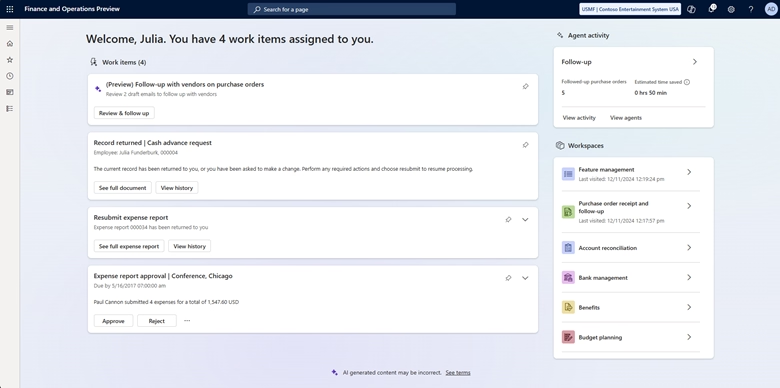
Microsoft continues to add Copilot capabilities to D365 F&O, with many focused on reducing manual work. Copilot experiences assist users with specific tasks, while AI agents can monitor ERP information, identify exceptions, and recommend or complete actions within configured limits.
Areas where these capabilities can help include:
- Financial close. Copilot capabilities can support reconciliation and financial analysis. The Account Reconciliation Agent can evaluate reconciliation exceptions and recommend actions, but it is currently a production-ready preview feature and requires specific setup and activation. See our guide to using Copilot for financial close and reporting.
- Procurement. The Procurement Agent can draft purchase-order follow-ups, analyze vendor responses, and help purchasers assess proposed supplier changes. These supplier-communication capabilities are currently available as a production-ready preview in Dynamics 365 Supply Chain Management.
- Demand planning. AI-supported forecasting and anomaly detection can help planners identify meaningful changes and investigate exceptions more efficiently.
- Warehouse operations. Depending on the applications and features in use, organizations can combine mobile scanning, warehouse automation, and intelligent planning capabilities to reduce manual work and improve exception handling.
One caution before enabling AI: these capabilities depend on the quality of the data and controls beneath them. An inconsistent chart of accounts, unreliable master data, or overly broad permissions can create larger problems rather than solve them. Read our guidance on adopting AI in ERP without creating data risk before expanding AI across critical processes.
Right-size your licenses and security roles
Licensing is an overlooked value lever, and Microsoft has introduced per-user license validation for Finance and Operations applications. Organizations should align assigned licenses with user access and security roles to help prevent access disruptions as validation applies to their environments.
In F&O, a user’s assigned security roles and privileges help determine which license they require. Years of accumulated role assignments can leave organizations paying for access users no longer need or create situations where assigned licenses do not match actual permissions.
The License Usage Summary and Security Governance tools within F&O can help administrators identify license requirements, role assignments, and potential compliance issues. Review licenses and security roles regularly, particularly when responsibilities change, employees leave, or new functionality is introduced.
For a full picture of license types and how they work together, see our Dynamics 365 Finance & Operations licensing and pricing guide.
Build a release cadence instead of reacting to updates
Microsoft organizes new Dynamics 365 F&O capabilities into two annual release waves, while Finance and Operations applications also receive scheduled service updates throughout the year. Organizations that treat every update as a surprise can spend much of the year reacting rather than improving.
Build a simple recurring rhythm instead. Assign someone to review each release plan and identify relevant capabilities. Test the shortlist in a sandbox, determine what should be enabled, and communicate upcoming changes to affected users before they reach production.
This turns Microsoft’s roadmap into a potential source of value rather than a source of disruption.
Invest in adoption, not just training
Project training teaches people how to complete processes in the new system. Adoption helps them understand why the process matters and encourages them to continue using it correctly.
Post-go-live adoption gaps tend to appear in predictable places. New employees who joined after launch may never have received the original training. Power users may leave with undocumented knowledge. Processes may change without corresponding updates to instructions or training materials.
Address these risks with ongoing Dynamics 365 training and a structured change management plan that continues beyond launch. Assign an owner to every core process and give that person the time and authority needed to maintain it.
Measure value with a focused set of KPIs
Start with a manageable set of approximately five KPIs that align with the problems identified during the health check.
Useful measures are dependent on your industry and may include:
- Days required to complete the financial close
- Days sales outstanding
- Purchase-order approval cycle time
- Inventory turns
- Percentage of invoices processed without manual intervention
Compare each measure with the baseline established during the health check. These KPIs show whether optimization efforts are delivering results and provide evidence to support future investments. Our improve your implementation ROI service is built around this measurement and improvement cycle.
What this looks like in practice
The Museum of Fine Arts, Houston operated on a financial system that had been in place for more than 20 years. Reports printed on green-bar paper, information could not be exported to Excel, and purchase orders moved through manual processes that contributed to delays, lost paperwork, and late vendor payments.
Working with Rand Group, MFAH moved to Dynamics 365 Finance & Operations. The team configured six financial dimensions for nonprofit reporting, enabled multiyear project accounting for exhibitions and capital projects, and automated purchase approvals through email-based workflows.
The results demonstrate what can happen when the platform is configured around how an organization operates:
- 50% reduction in the monthly close cycle
- 3-day financial close timeline
- 67% faster purchase approval process, down from three days to one
Those improvements did not come from continually adding software. They came from configuring the platform to support the organization’s processes and reporting requirements. Read the full Museum of Fine Arts, Houston case study.

Ready to get more from the ERP you already own?
Whether you went live last quarter or three years ago, there is often additional value available within your existing platform. Our Dynamics 365 Finance & Operations team can help you identify it, prioritize it, and measure the results.
How Rand Group helps you get more from D365 F&O
Rand Group has been a Microsoft partner since 2003, with a 90% client retention rate that reflects how we work with clients after implementation. Our team combines financial, operational, and technical expertise. That matters when the question is no longer simply, “Does the system work?” but “Is the system delivering enough value?”
We help organizations throughout the post-go-live journey with:
- Implementation health checks that identify gaps between purchased functionality and actual use
- Performance optimization that diagnoses batch, code, integration, and configuration issues
- Reporting and analytics that replace unreliable spreadsheet processes with reporting stakeholders can trust
- Training and change management that support adoption despite process and staffing changes
- Ongoing Dynamics 365 Finance & Operations support focused on long-term optimization, not only break-fix tickets
We work with organizations across manufacturing, oil and gas, distribution, professional services, nonprofit, food and beverage, and other industries. This experience helps our consultants recognize recurring problems while accounting for the requirements that make each organization different.
Key takeaways
- Go-live is the beginning of ERP value realization, not the end of the project.
- A post-go-live health check can identify unused functionality, process gaps, reporting issues, data-quality problems, and adoption challenges.
- Many organizations can get more value from D365 F&O by using capabilities they already own, such as budget planning, recurring journals, financial reporting, workflow, and security tools.
- Performance, licensing, release management, AI readiness, and user adoption should be reviewed regularly after go-live.
- Optimization should be measured against focused business KPIs, such as close time, approval cycle time, DSO, inventory turns, or invoice automation rates.
Frequently asked questions
How long after go-live should we start optimizing D365 F&O?
Organizations should begin measuring performance and adoption immediately after go-live. Broader optimization often begins after the initial stabilization period, commonly within the first 60 to 90 days. The appropriate timing depends on implementation complexity, issue volume, operational readiness, and whether critical processes are running consistently.
Do we need new licenses to use the AI features in D365 F&O?
It depends on the specific capability. Some embedded Copilot experiences are available through eligible Dynamics 365 F&O licenses, while AI agents and Copilot Studio-based scenarios may require Copilot Credits, billing to be enabled, additional capacity, premium connectors, or other licenses.
Why is our Dynamics 365 Finance & Operations system slow after go-live?
Post-go-live performance issues may be related to competing batch jobs, custom code, integrations, configuration choices, database growth, inefficient queries, or processes that behave differently under production volumes and concurrent use. A performance investigation should use telemetry and process-specific evidence rather than assuming one universal cause.
What is the difference between Dynamics 365 Finance and Dynamics 365 Supply Chain Management?
Dynamics 365 Finance supports general ledger, accounts payable, accounts receivable, budgeting, cash management, and financial reporting. Dynamics 365 Supply Chain Management supports procurement, inventory, warehousing, manufacturing, asset management, transportation, and supply chain planning. The applications share a common platform and data model, and many organizations use both. Our overview of Dynamics 365 Finance & Operations modules explains how the applications and their capabilities fit together.
What is a D365 F&O post-go-live optimization plan?
A post-go-live optimization plan identifies the highest-priority opportunities to improve performance, reporting, adoption, automation, licensing, and business process outcomes after implementation.
What should be included in a D365 F&O health check?
A health check should review module usage, system performance, batch jobs, integrations, customizations, data quality, reporting gaps, security roles, license alignment, user adoption, and KPI performance.
Getting long-term value from D365 F&O
The gap between a working ERP and a valuable ERP is rarely about software alone. It also depends on who continues to evaluate the platform after the implementation team leaves.
Some support providers primarily respond to tickets. Others help monitor the product roadmap, identify relevant capabilities, address performance and adoption issues, and connect improvements to measurable outcomes.
Whether you went live last quarter or three years ago, there may still be untapped value within your platform. Contact Rand Group to identify the highest-priority opportunities and develop a practical plan for realizing them.